
The lower toolbar includes some very important general settings including the decimal places. But lets start from left to right:
Read more: Specifying decimal places and other functions of the lower toolbar
An advantage over traditional calculators is, that you can edit, change calculations on the fly. More or less as you would do it with Excel, but with the same ease that you know from your traditional calculator.
- Insert, delete, change numbers and/or arithmetic operators anywhere on a tape.
- Cut, copy, paste individual tape lines, sections of a tape, or an entire tape.
- Import/export columns of numbers from/to other programs via the clipboard.
- Sort the numbers on a tape.
- Open and work with more than one file at a time.
- Use up to 10 tapes per file to organize, and work simultaneously with, several separate but related calculations.
 |
Today I am gonna introduce the printing options of DeskCalc. This is the summary of all requests concerning printing of thousands of users working with this software tape calculator on a daily basis. Feel free to contact us, if you still miss something... |
Read more: Printing Desktop Calculator for Windows : Printing Calculator Program
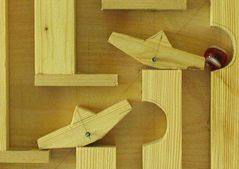 Today I found some really strange adding machines that I want to share with you. Lets start with a marbe adding machine... you can even buy one for only US$250, worth more than 10 DeskCalc licenses :)
Today I like to share some thoughts of other DeskCalc users with you. First of all, because it makes us feel good :) It seems like we are doing the right thing. We always wanted DeskCalc to be as smart and easy to use, as an conventional adding machine for users who, for many different reasons, wanted an adding machine for their PC. Actually that's us as well, that is the reason why this calculator was created. Thanks for your comments, wishes and complaints as they are always welcome.
Read more: Some user comments we got the last couple of weeks.